1
Diagnose current status
Enter your homepage URL to check what's missing in search and AI visibility.
82AI visibility
Diagnosis complete
Core info looks solid
2 items to improve
ABOUT ALLEO
Diagnose to pick topics,
then the agent writes and we spread it on SNS.
Diagnosis → Priority → Writing → Channel spread
Enter your homepage URL to check what's missing in search and AI visibility.
Core info looks solid
Find questions customers ask often and visibility opportunities you're missing.
Today's tasks
Highest-impact first
Interview or one-click: the agent turns experience into a post.
3 things first-time visitors need to know
Share one post across channels and check how people respond.
Channel visibility
Get discovered more
Analyze your site by SEO, AEO, and GEO, then show missing items in order of impact.
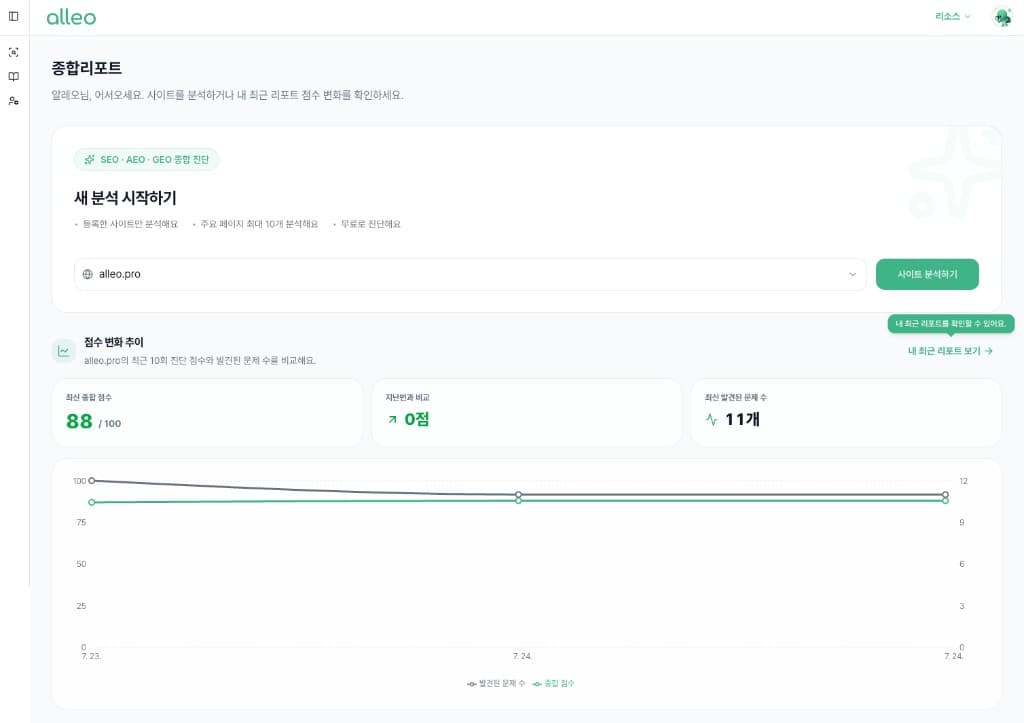
Actual console screen
Check whether your brand is cited when customers ask AI a question.
Brand exposure checks are available from the Growth plan.
Any reliable businesses around here?
We recommend our brandwith good reviews. Detailed cases are organized in their blog.
Blog post cited as sourceCompare questions customers search for with your current site to split keywords to find and keywords to strengthen.
Analyzed keywords 18
Based on recent analysisKeywords to find
Start nowQuestions customers search but you haven't answered yet
Keywords to strengthen
Content that needs more evidence and explanation
You can move from priority keywords straight into blog writing.
We list channels you can act on now—Place, Google Business, directories—with importance and time.
For medical and finance, we start with informational channels.
Naver Place
Google Business
Industry directory
Just configure in the console, and you can immediately run a blog optimized for search and AI.
Start with free address
Get a basic subdomain instantly to start content creation and publishing immediately.
Free address
Instant issuance
Company domain
Easy connection
Connect your existing address to run under your brand name.
Custom domains start on Growth.
From domain verification to SSL issuance and HTTPS application status—no separate checking needed.
SSL certificate
Auto-applied
Connection status
See at a glance
Free address
brand.alleo.blog
Domain connection
blog.company.com
SSL verification
Auto-issued
HTTPS
Connected
Automatically behind your posts
When you publish content, sitemap, metadata, sharing settings, and structured data are automatically applied behind the article.
Publish one article and
We prepare the technical settings search engines and AI need to understand content.
Setup method
Automatic
Separate work
None
Applied to
Search & AI
We organized your field experience into posts search engines and AI can easily understand.
Automatic sitemap generation
Automatic meta tags
Automatic Open Graph
WebP image optimization
Lazy Loading
Image Alt tags
Canonical URL
Robots.txt
404 page handling
JSON-LD structured data
Responsive blog
Heading structure optimization
Right from the console
Adjust preset themes, custom colors, hero backgrounds, layouts, and header inquiry buttons from settings.
Brand color
Direct specify
Hero background
Image select
Just change settings
Adjust colors, backgrounds, and layouts to match your brand without development.
Colors
Custom
Hero
Choose
Layout
Adjust
Set primary, secondary, and background colors directly.
Choose provided background images or upload your own.
Adjust list style and inquiry button display.
Design settings
Adjusting to match brand
Brand color
Theme presets
Magazine
Minimal
Dark
Layout
List format
Header button
Contact CTA
Topic selection
Pick a recommended topic from keyword opportunities and improvement tasks, or enter your own.
Recommended topics
3How brands show up in AI search
Keyword opportunity
Criteria to check before choosing a service
Improvement task
How our service differs from other brands
Expandable
1 topic selected to write now
Questions customers search for but haven't been answered yet
Create a draft
Answer a few questions or tap once to get a draft. Both paths open the same editor.
Interview with AI
Answer a few questions to get a draft.
What questions do customers ask most when choosing your service?
They ask about differences from other services more than price.
One-click generate
Create a draft from saved blog and agent info.
Confirm topic
Apply career
Save draft
You need a career agent to use this path.
Either path continues in the draft editor.
Draft editing
Check title, body, thumbnail, and images, then freely edit to your preferred expressions.
Your draft is ready
Drafted from the path you chose
BRAND BLOG
Checklist
Publish & spread
Transform the blog original to fit each channel's length and tone, then publish immediately or schedule.
Original content
Three things to check before customers choose a service

Threads
Recommended


X

Use one article across multiple channels right away
SNS connection and publishing stay locked on the Free plan.
Upload from the blog, or write a new post in SNS.
Blog stats
Visitors
1,248
+18%
Pageviews
2,836
+24%
Avg. time on page
3m 12s
+9%
Visit flow
Last 7 days
Content response
How our brand shows up in AI search
482How to turn frequently asked questions into content
326The structure of brand posts that last in search
218Visit environment
AI access
WORKSPACE
Analysis and content history continue based on one workspace—not individual accounts.
The account career profile is secondary. Writing uses the workspace career AI agent.
Create an agent that knows your shop so interview and one-click drafts share the same expertise.
Invite teammates and manage the same brand's analysis and content together.
Check usage limits for analysis, content writing, and channel publishing.
Find hidden opportunities with a free AI diagnosis.